Hjälpcentral
How to Delete/Remove a WordPress theme from the WordPress Dashboard? Skriv ut denna artikeln
We recommended you to remove unused themes. This is a good practice for protecting your WordPress website from vulnerabilities.
1. Login to your WordPress admin dashboard.
2. Under the dashboard menu, hover your mouse on "Appearance" and then click on "Themes".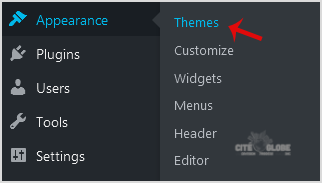
3. Hover your mouse on a theme which is not active and unused or you wish to remove that theme. It will show you the option "Theme Details". Click it.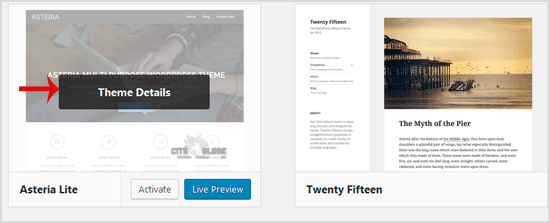
4. A simple window will open. At the bottom area, in the right side of the window, you can see the "Delete" option. Click it!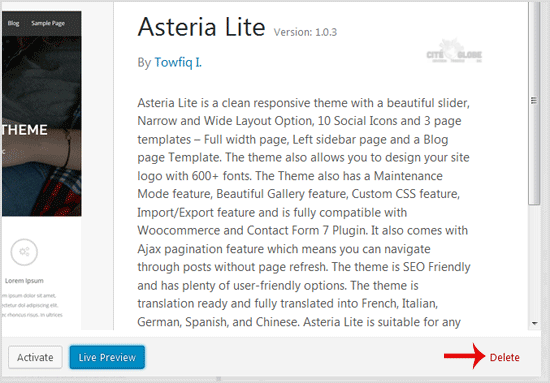
5. A confirmation window will open. Click "OK" to remove your theme.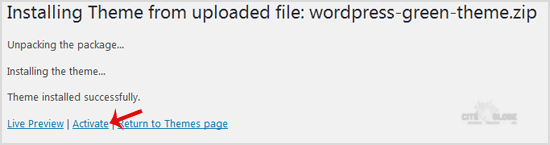
The theme is successfully removed!
Hjälpte svaret dig?
Relaterade artiklar
Où trouver de l'aide pour mon site WordPress?
Grâce à une communauté très active, il existe de nombreux sites pour vous aider à créer un site...
Grâce à une communauté très active, il existe de nombreux sites pour vous aider à créer un site...
How to Manually Install a Plugin in WordPress?
Automatic installation of a plugin is easy and you can also install on manually. It will involve...
Automatic installation of a plugin is easy and you can also install on manually. It will involve...
Comment désactiver le wp-cron.php dans WordPress
WordPress utilise un fichier appelé wp-cron.php comme tâche cron virtuelle ou tâche planifiée...
WordPress utilise un fichier appelé wp-cron.php comme tâche cron virtuelle ou tâche planifiée...
Réinitialisation de votre mot de passe Wordpress
Pour réinitialiser votre mot de passe WordPress, vous pouvez consulter la documentation...
Pour réinitialiser votre mot de passe WordPress, vous pouvez consulter la documentation...