Kennisbank
How to remove the Uncategorized category from WordPress? Print dit artikel
You can not remove "Uncategorized" Category but you can rename it
1. Login to your WordPress admin dashboard.
2. Under the dashboard menu, hover your mouse on Posts and then click on "Categories".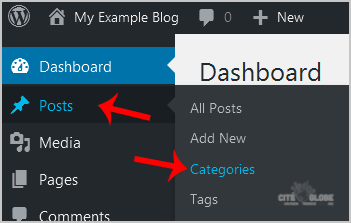
3. On the right side you can see the "Uncategorized" category option. Hover your mouse on it and a few options will appear. Click on the "Quick Edit" option.
4. Change the name and slug and then click on the "Update Category" option.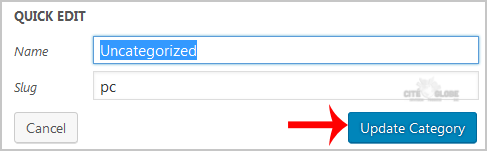
Was dit antwoord nuttig?
Gerelateerde artikelen
How to remove sample comments, posts on a new WordPress blog?
If you installed a fresh WordPress blog system on your website ,before writing new posts, you...
If you installed a fresh WordPress blog system on your website ,before writing new posts, you...
How to access the Wordpress admin account?
WordPress is a CMS software with an easy to access admin account and a simple to manage blog...
WordPress is a CMS software with an easy to access admin account and a simple to manage blog...
Comment transférer votre site WordPress depuis un autre hébergeur
Pour transférer votre site WordPress de votre hébergeur actuel vers nos serveurs, consultez...
Pour transférer votre site WordPress de votre hébergeur actuel vers nos serveurs, consultez...
How to Manually Install a Plugin in WordPress?
Automatic installation of a plugin is easy and you can also install on manually. It will involve...
Automatic installation of a plugin is easy and you can also install on manually. It will involve...
How to add a new category in WordPress?
1. Login to your WordPress admin dashboard.2. Under the dashboard menu, hover your mouse on Posts...
1. Login to your WordPress admin dashboard.2. Under the dashboard menu, hover your mouse on Posts...