Preguntes Freqüents - FAQ
How to remove the Uncategorized category from WordPress? Imprimeix aquest Article
You can not remove "Uncategorized" Category but you can rename it
1. Login to your WordPress admin dashboard.
2. Under the dashboard menu, hover your mouse on Posts and then click on "Categories".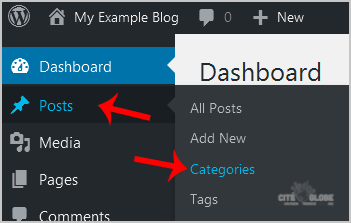
3. On the right side you can see the "Uncategorized" category option. Hover your mouse on it and a few options will appear. Click on the "Quick Edit" option.
4. Change the name and slug and then click on the "Update Category" option.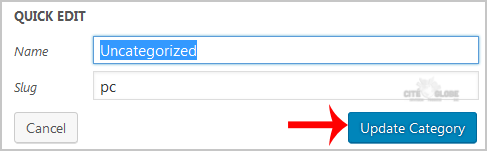
Ha estat útil la resposta?
Articles Relacionats
How to remove sample comments, posts on a new WordPress blog?
If you installed a fresh WordPress blog system on your website ,before writing new posts, you...
If you installed a fresh WordPress blog system on your website ,before writing new posts, you...
How to add a new category in WordPress?
1. Login to your WordPress admin dashboard.2. Under the dashboard menu, hover your mouse on Posts...
1. Login to your WordPress admin dashboard.2. Under the dashboard menu, hover your mouse on Posts...
How to remove a category in WordPress?
If you want to remove WordPress category then follow this instruction:1. Login to your WordPress...
If you want to remove WordPress category then follow this instruction:1. Login to your WordPress...
Comment configurer le SMTP dans Wordpress.
Vous devez installer et configurer le module/plugin WP Mail SMTP de WPForms dans votre...
Vous devez installer et configurer le module/plugin WP Mail SMTP de WPForms dans votre...