Preguntes Freqüents - FAQ
How to start writing your first blog post in WordPress? Imprimeix aquest Article
1. Login to your WordPress admin dashboard.
2. Under the dashboard menu, hover your mouse on Posts and then click on "Add New".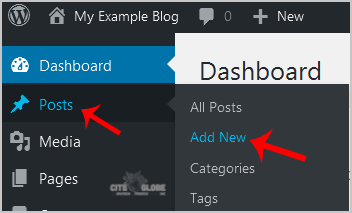
3. Enter Title in Title box and write your blog post.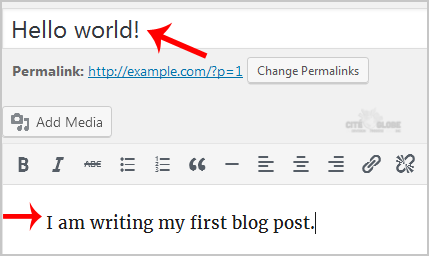
4. Scroll down to the "Tags" option and enter tags. If you wish to enter multiple tags, use comma and then click on the "Add" button.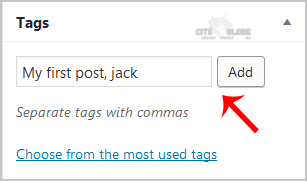
5. Select the appropriate category or click on "Add New Category".
6. Now scroll up and find "Publish". Then click it.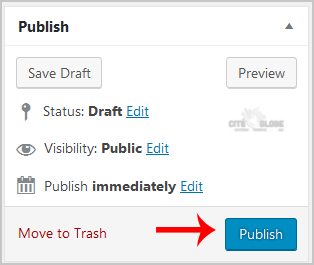
Ha estat útil la resposta?
Articles Relacionats
How to add a new category in WordPress?
1. Login to your WordPress admin dashboard.2. Under the dashboard menu, hover your mouse on Posts...
1. Login to your WordPress admin dashboard.2. Under the dashboard menu, hover your mouse on Posts...
How to Change the Display Name of a WordPress User Account?
You can change the display name of your WordPress account which show on a WordPress post or...
You can change the display name of your WordPress account which show on a WordPress post or...
Modfiier le domaine de votre WordPress
Pour modifier le domaine de votre site web WordPress,vous pouvez consulter les instructions...
Pour modifier le domaine de votre site web WordPress,vous pouvez consulter les instructions...
Comment désactiver le wp-cron.php dans WordPress
WordPress utilise un fichier appelé wp-cron.php comme tâche cron virtuelle ou tâche planifiée...
WordPress utilise un fichier appelé wp-cron.php comme tâche cron virtuelle ou tâche planifiée...