Vidensdatabase
How to start writing your first blog post in WordPress? Print denne artikel
1. Login to your WordPress admin dashboard.
2. Under the dashboard menu, hover your mouse on Posts and then click on "Add New".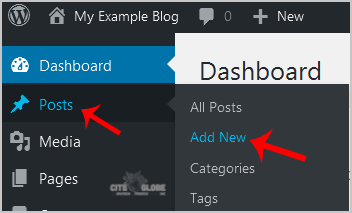
3. Enter Title in Title box and write your blog post.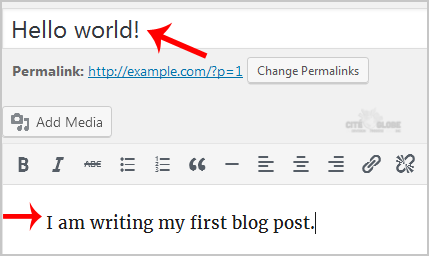
4. Scroll down to the "Tags" option and enter tags. If you wish to enter multiple tags, use comma and then click on the "Add" button.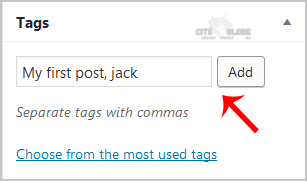
5. Select the appropriate category or click on "Add New Category".
6. Now scroll up and find "Publish". Then click it.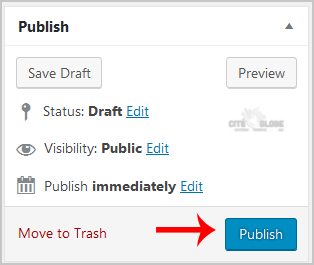
Hjalp dette svar dig?
Relaterede artikler
Réinitialisation de votre mot de passe Wordpress
Pour réinitialiser votre mot de passe WordPress, vous pouvez consulter la documentation...
Pour réinitialiser votre mot de passe WordPress, vous pouvez consulter la documentation...
How to Install a Plugin in WordPress?
You can install a plugin in WordPress in a number of ways. The best way to install a plugin is to...
You can install a plugin in WordPress in a number of ways. The best way to install a plugin is to...
How to Delete/Remove a WordPress theme from the WordPress Dashboard?
We recommended you to remove unused themes. This is a good practice for protecting your WordPress...
We recommended you to remove unused themes. This is a good practice for protecting your WordPress...
Comment configurer le SMTP dans Wordpress.
Vous devez installer et configurer le module/plugin WP Mail SMTP de WPForms dans votre...
Vous devez installer et configurer le module/plugin WP Mail SMTP de WPForms dans votre...